Content Editor Pro
A Chrome extension that rewrites any webpage in real-time — replace text, inject your own HTML, and strip clutter with domain-scoped rules that keep working as the page changes.
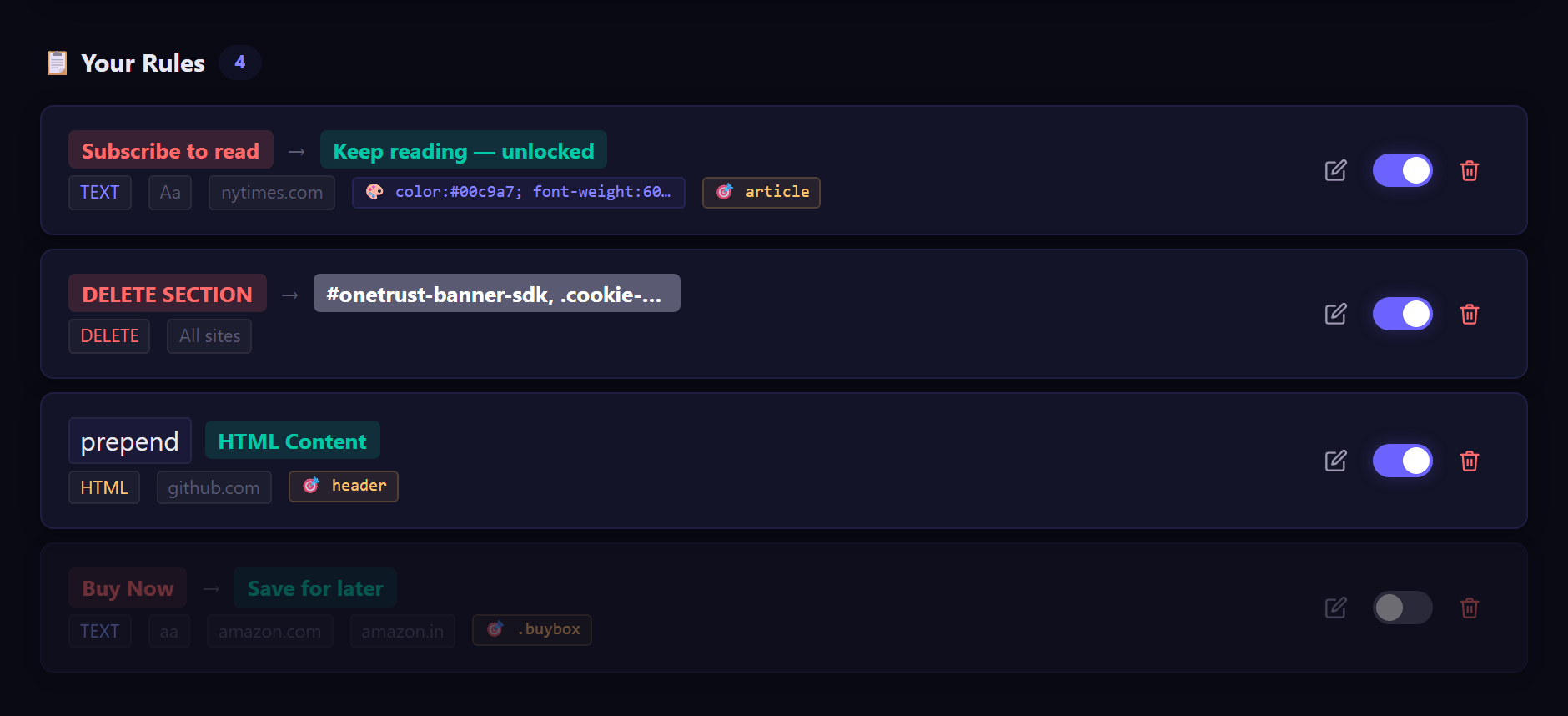
Rewrite the Web in Real-Time
Three rule types, one always-on engine — your changes apply the moment a matching page loads and stay applied as it changes.
Text replacement
Find-and-replace any text on a page with your own wording. Matches are literal (not surprise regex), can be case-sensitive, and can be styled inline so replaced text stands out.
HTML injection
Insert your own HTML anywhere on the page — append, prepend, replace, or place it before or after a target element. Duplicate-safe, so it injects exactly once per target.
Element deletion
Remove the clutter — banners, popups, sidebars — with a CSS selector. Gone before you notice it was there.
Live on dynamic content
A single MutationObserver re-applies your rules as new content streams in, so single-page apps, infinite feeds, and lazy-loaded sections stay rewritten — no reload needed.
Domain & selector scoping
Restrict each rule to specific domains (and their subdomains) and to a container selector — precise edits with zero collateral changes elsewhere.
Manage Your Rules
A clean options page to author rules and a one-click popup to control them everywhere.
Full rule CRUD
Create, edit, reorder, and enable or disable rules from a single options page — each rule clearly labeled by type and scope.
Instant apply, no reload
Saving a rule broadcasts to every open tab and re-runs immediately. You see the change happen without refreshing a thing.
Synced across your devices
Rules live in chrome.storage.sync and follow you across every Chrome you're signed into — set them once, use them everywhere.
Quick global toggle
The toolbar popup flips the whole engine on or off and lists your active rules at a glance — handy when you need the original page back fast.
Built to Ship & Sell
A productized extension with offline licensing and one-command packaging — ready for the Chrome Web Store.
Signed license keys
Access is gated by ECDSA P-256 signed, date-limited keys. Activation and expiry take effect live, and verification runs entirely offline in the service worker.
Fully offline & private
No servers, no tracking, no data leaves the device. Only minting a key needs a secret — and that's done by you, not the user.
Manifest V3 architecture
A modern service-worker design with storage as the single source of truth and message bus — Web Store-ready out of the box.
One-command packaging
A single build script produces the unpacked folder, the Web Store zip, and a signed .crx with a stable extension ID — and aborts if a secret would ever leak.
From install to a rewritten page
Set up a rule once and the engine keeps it applied — across tabs, across reloads, across dynamic content.
Install & activate
Load the extension in Chrome or Edge and paste your license key into Settings to unlock the engine.
Create a rule
Pick a type — replace text, inject HTML, or delete an element — and fill in the find text, HTML, or selector.
Scope it
Limit the rule to specific domains and, optionally, a container selector so it only touches what you intend.
It applies instantly
The rule runs on every matching open tab right away — no page reload, thanks to the live storage broadcast.
It stays live
As pages load more content, a MutationObserver re-applies your rules so the page stays the way you want it.
See Content Editor Pro in action
A look at the real product. Click any screen to expand.
Integrations
Built with
Questions, answered
Three things: replace any visible text with your own wording, inject your own HTML anywhere, and delete elements you don't want. Each rule can be scoped to specific domains and a container, so changes stay surgical.
Yes. A MutationObserver re-applies your rules as new content loads, so feeds, SPAs, and lazy-loaded sections stay rewritten without a refresh.
No. The engine runs fully offline and nothing leaves your device. License verification also happens locally — only minting a key uses a secret, and that's done by us, not by you.
Each install is activated with a signed, date-limited key that's verified offline. Licenses are per device, so each machine activates separately.
Chrome and Chromium-based browsers such as Microsoft Edge. It's a Manifest V3 extension, so it's ready for the Chrome Web Store.
Ready to see Content Editor Pro?
Book a walkthrough and we'll tailor the demo to your workflow.